Reflection:
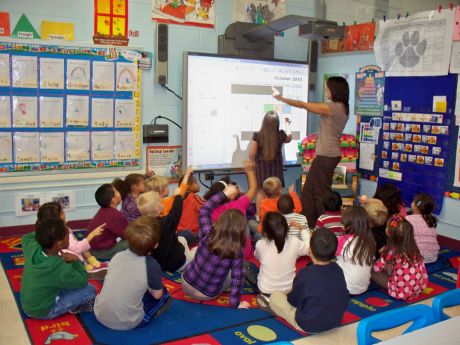
Throughout my Educational Technology course, I learned several skills that I will carry with me into my teaching career. At the beginning of the course I didn’t know much about technology that is used in classrooms. As I conducted interviews with elementary school teachers I quickly found out about these teaching tools and how they are used in the classroom. I learned about the Smartboard and some of the things it allows teachers to do in front of the class, such as show videos or pull up the class textbook and related activities. I also got several tips from the teachers about using technology in the classroom and how it benefits students. I learned that using technology allows the students to visualize information that is being taught which usually results in a better understanding. This demonstrates the constructivism model of teaching, which is where teachers allow students to explore independently to find their own answers. The teachers also shared with me the websites that they use in their classrooms. I didn’t know much about websites that have been created for teachers and their students when I started this course; however I have learned that there are websites that have lesson plan ideas on them and also websites that allow students to play interactive learning games and take quizzes. By talking with teachers who use technology in their classrooms every day, I was able to get a lot of good information and helpful tips that I will be able to use as a teacher. I also had the opportunity to explore websites and software programs in my Educational Technology course that may help me in the future. The program that I am most excited about is Excel. Although I had heard of Excel before, I never attempted to use it because I didn’t get the point of it. Now I understand that there are so many things I can use Excel for, including creative pictographs and calculating students’ grades. Now that I have learned how to use Excel it seems fairly simple, although I’m sure there is a lot more for me to learn about the program. Another activity I was able to participate in was creating a full lesson plan. It took a lot of work creating the lesson plan, meeting standards, planning ways to incorporate technology, and producing a back-up plan in case the something went wrong, but seeing children learning in worth it. I also got the experience of co-planning which will help me in my teaching career as I may be creating lesson plans with my colleagues. I benefited greatly from this assignment and learned so much about creating lesson plans that will encourage students to learn using the constructivism model. Overall I learned a lot from this course that I will surely carry with me.
Look at my Excel pictograph (click here).
Below are some websites that I learned about throughout my educational technology course and the teacher interviews I conducted. Feel free to click on the sites and explore them!
www.pearltrees.com Pearltrees allows teachers to connect with others to view the ideas they have posted. Once a 'tree' is created, 'pearls' containing various materials (however you want to organize them) can be added to the 'tree'. It is easy to view other people's pearltrees and get some of their ideas to add onto yours.
www.teachertube.comTeachertube is an excellent resource for teachers because unlike youtube, it usually isn't blocked by firewall. Yet Teachertube has similar videos as youtube that a teacher would want to show their class.
www.unitedstreaming.com United Streaming is a site from Discovery that contains various videos from most subjects. These videos are great to show in the classroom and it is easy to find a video for the subject being taught.
www.prezi.com Prezi is a great tool to use for creating slide-show presentations. It offers visual appealing presentations that can have videos and graphics in them. It is easy to use and looks sharp!
www.voki.com Voki allows its user to create an avatar that talks! Once an avatar is created, simply give it a voice and present it. Teachers can use Classroom Voki as a fun and easy way to connect with their students in and out of class.
www.photopeach.com Photo Peach is a site for creating videos. I created my video (on the home page) using Photo Peach and found it to be very simple. You can add pictures, commentary, and music to a video which allows for endless possibilities.
www.yola.com Yola is for creating websites, like this one! I created this site using Yola and thought it was fairly simple to use. Yola is also free; although there are options to purchase a Platinum web-builder, I found that I could create a cool website without it. There are so many different options for creating your own website.
www.lessonopoly.org Lessonoply is a great resource for teachers looking to get ideas from other teachers. Lessonoply contains lesson plans that other teachers created. Even if you see a lesson you like but it doesn't meet some of the standards, it is fairly simple to change around while still using some of the ideas and worksheets that the other teacher posted.
www.pinterest.com Pinterest is a source teachers can use to get ideas for their classroom. It is easy to find ideas from others and 'pin' them to your board so you use them. I already have a 'Teaching Board' set up so that when I have my own classroom and I can use some of the ideas that I found to make it fun for my students!
www.yammer.com Yammer is social networking site set up for classrooms or businesses. Yammer can be used by teachers to connect with students, parents, and/or colleagues. The creater of a Yammer group picks who to invite in that group, so it is safe from outsiders. Yammer allows its user to post a question or comment that other users in that group can respond to.
